Check your prescription coverage and costs online
Are you wondering about your prescription drug coverage and how much your prescription will cost? Whether you pick up your prescriptions at an in-network retail pharmacy or have them delivered, you can find and compare prices and medication details for prescription drugs covered by your TRICARE pharmacy benefit online through Check Coverage.
Check Coverage shows your cost for both a 30-or 90-day supply at in-network retail pharmacies and up to a 90-day supply at TRICARE Pharmacy Home Delivery so you can easily compare your options. Check Coverage is available through your Express Scripts online or Express Scripts® Pharmacy mobile app account and contains information specific to your active prescriptions.
If you are taking generic medication, keep in mind that obtaining it from a local in-network retail pharmacy may offer additional cost savings.
To access Check Coverage, log in to your Express Scripts account1. If you do not already have an online account, register today or download the free Express Scripts® Pharmacy mobile app from the Apple App Store or Google Play Store.
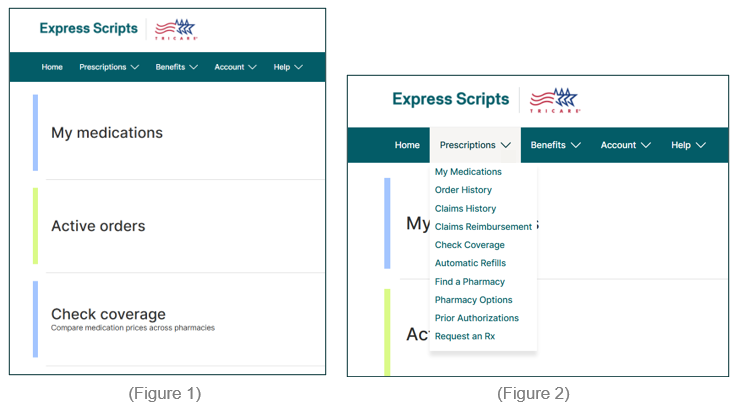
Once logged in, select Check Coverage from the home page (as shown in Figure 1) or navigate to Prescriptions in the top menu bar and select Check Coverage (Figure 2). If using the mobile app, navigate to the More menu and select Check Coverage.
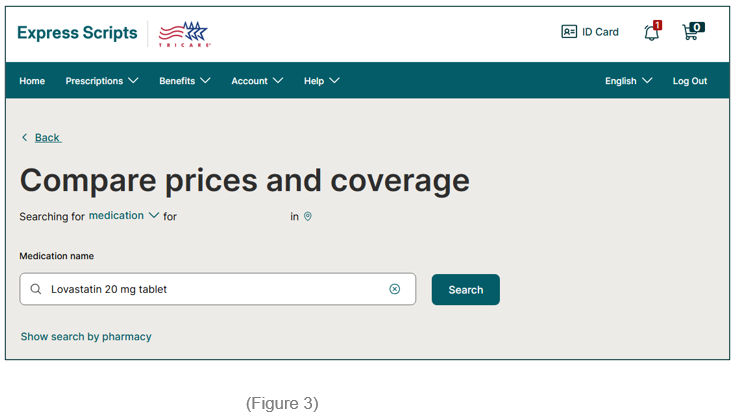
To complete a search, enter the medication name, as shown in Figure 3. Once you select your medication, you can review available pharmacy options, coverage information, and costs for covered brand and generic medications. You can also review key medication details, covered alternatives and drug descriptions.
Review the available pharmacy options, coverage information, and costs to determine which option best meets your needs.
If you do not already have an online account set up, register2 today to start using Check Coverage.
Updated 8/14/2026.
- 1
To register for an Express Scripts online account, visit militaryrx.express-scripts.com, select Register, and follow the prompts to verify your information, and create your username and password. Note: You will need to provide your DoD Benefits Number (DBN) or Social Security Number (SSN) to verify your identity.
- 2
If you experience problems registering for an online account, contact Express Scripts for assistance.